Improved Claude Code Settings Schema with Environment Variable Autocomplete#
Published by Alex Sorokoletov
Update (January 27, 2026): Unfortunately, Claude Code now complains about custom
$schemaURLs in settings files. The autocomplete still works in your editor, but Claude will warn you about the unrecognized schema. Use at your own discretion.
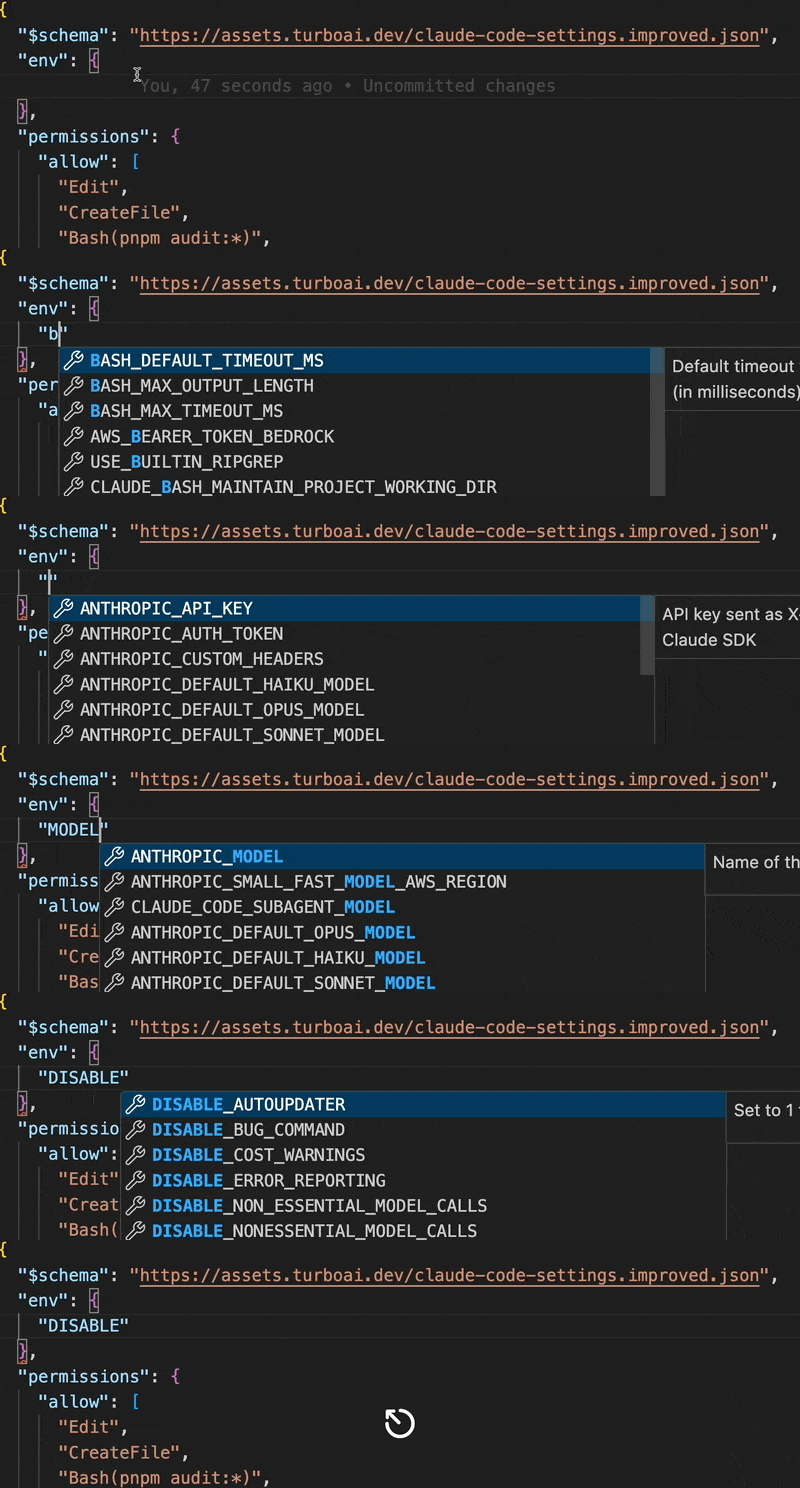
The official Claude Code settings schema doesn't autocomplete environment variables. Type "env": { and hit Ctrl+Space? Nothing. You're left googling whether it's DISABLE_NON_ESSENTIAL_MODEL_CALLS or DISABLE_NONESSENTIAL_MODEL_CALLS.
I got tired of this, so I built an improved schema with autocomplete for all 50+ environment variables. Grab it here.
What You Get#
Add this line to .claude/settings.json:
"$schema": "https://assets.turboai.dev/claude-code-settings.improved.json"
Now your editor autocompletes env vars with inline docs. Type "BASH_ and see all bash-related settings. Hover for descriptions.
Demo#
Useful But Hidden Settings#
Longer timeouts for builds:
{
  "env": {
    "BASH_DEFAULT_TIMEOUT_MS": "300000"
  }
}
Save on API costs:
{
  "env": {
    "DISABLE_NON_ESSENTIAL_MODEL_CALLS": "1"
  }
}
Clean git commits:
{
  "includeCoAuthoredBy": false
}
Full Example#
{
  "$schema": "https://assets.turboai.dev/claude-code-settings.improved.json",
  "permissions": {
    "allow": [
      "WebSearch",
      "Bash(npm run:*)",
      "Bash(git add:*)",
      "Bash(git commit:*)"
    ]
  },
  "env": {
    "DISABLE_NON_ESSENTIAL_MODEL_CALLS": "1",
    "BASH_DEFAULT_TIMEOUT_MS": "300000"
  },
  "includeCoAuthoredBy": false,
  "hooks": {
    "Stop": [{
      "command": ["terminal-notifier", "-title", "Claude Code", "-message", "Done"]
    }]
  }
}
The hook fires a desktop notification when Claude finishes. Useful for context switching.
What the Schema Covers#
- Autocomplete for 50+ environment variables inside the
envblock, with a description on hover. - Works in any editor that reads JSON Schema from
$schema, including VS Code and JetBrains IDEs. - One trade-off since January 2026: Claude Code warns about the unrecognized
$schemaURL, while editor autocomplete keeps working.
Related Guides#
For what each variable does, see the complete list of Claude Code environment variables. Permissions and CLAUDE.md setup live in the AI Coding Harness Guide, and compaction thresholds in the CLAUDE_AUTOCOMPACT_PCT_OVERRIDE guide.